The searchable home for your entire magic collection.
Every book, DVD, download and set of lecture notes you own, catalogued and searchable in plain language, down to the individual routine. Paper or digital.
Your digital items become a media server for your own magic: read, watch and pick up where you left off on any screen in the house. All from a folder on your own computer.
No subscription. A one-time purchase when it launches, with the AI included.
In private beta now. Request access and we'll email your invite when it's ready.
“I'm a working mentalist with more books, DVDs, and downloads than I can keep track of, and I kept buying material my own shelf already covered. So I built Maven to search everything I own first, in plain English.”
 Judah Gabriel Professional Mentalist & Software Engineer
From magicians in the private beta
“Been messing around with this and it’s really cool. I have a load of ebooks and can struggle to remember where a routine is, or which has stage work, and can just find it now.”
 David Peace Magician and Mentalist, Ireland
 “It helped me find a use for the rattle dice that I did not even think of! We all know that magic junk drawer. Something like this allows you to revisit that drawer and bring life to the effects in there.”
 Sebastian Toca Magician and Mentalist, Montreal STMagic on YouTube
“I’ve bought thousands of books, DVDs and downloads over my career, and it can be almost impossible to find resources for whatever plot I’m looking for. Last night I found exactly what I needed for a new routine, in a place I never would have thought to check.”
“Maven is brilliant: my personal magic cataloguer, researcher and organizer all in one. Its searches bring a collection alive, and I find myself dipping into items I didn’t even remember I owned. My best magic purchase of the year.”
Your whole collection
You own more magic than you can remember.
You have an idea and you know what you want to learn. Where do you start? Not your own bookshelf, because you do not even know where to look. So you search a store, scroll the results, and buy something new when a shelf you already own probably covers it.
Maven flips that. Research your own library first.
Describe the effect the way you would say it out loud. Or use the filter box for plain keywords, which runs in your browser against your own files with nothing sent anywhere.
The catalog lists what is inside each book, DVD and download, so a search lands on the exact routine rather than the shelf it might be on. Where a book’s contents are published with page numbers, or you photograph its contents page, it lands on the page too.
A physical book needs nothing but its title. Search finds the routine, tells you which book it is in and often what page it starts on, and you take it off the shelf. Nothing has to be a file for any of this to work.
Tuned on plots, sleights, props and principles, so it understands what you are trying to accomplish instead of matching words.
Volume four of a series, the deluxe reissue, the boxed set with two extra discs. Those are different items with different contents, and it works out which one you actually own.
Cover art for everything you own, filtered by kind, creator or your own tags, for the days when you would rather look than search.
8,000+ books indexed
MagicRef is Doug Atkinson’s hand-built magic book reference, and Maven reads it with his permission. When a book on your shelf is one of them, its routines and their page numbers come straight across, so searching your library finds the effect rather than just the title. Books it does not cover are catalogued the usual way. Visit MagicRef.
Getting your shelf in
All it needs is a title and an author.
Other cataloguing apps hand you a blank form for every item: type the author, the year, the contents, the tags, all by hand. There is nothing to fill in here. You say what you own, and the contents, the creators and the year get filled in for you.
A title and an author is all it needs, and often just the title.
Every title is looked up online the moment you add it, across product pages, published indexes and reviews.
The contents, the creators and the year, written into plain files in a folder you chose.
Six ways to load your shelf, depending on where it already lives.
-
 An MLI file from Vanishing Inc. Officially supported
Magic Library Interchange is the open format for moving a library between services, and Maven is the first app to support it. Every title arrives with the shop's own product page already attached.
- One click from a store you already buy from
Penguin Magic, Vanishing Inc and others: pull in everything you have ever purchased, including the downloads you had forgotten you owned.
- A photo of your bookshelf
Point your camera at a shelf. It reads the spines, you tidy the list, and it researches each title from there.
- A pasted list, or typed as you go
One title per line, an author if you have it. Adding a single book by hand works exactly the same way.
- Point it at your folder of downloads Chrome, Edge or Brave on desktop
PDFs, ebooks and video already on your disk or in Google Drive get catalogued where they sit, however deep the subfolders and however you have named the files.
- A spreadsheet from another tool
Already keep a list in Excel, Notion, Airtable or another cataloguing app? Export it as CSV and bring it straight over.
What happens after you add something →
Vanishing Inc. and the Vanishing Inc. logo are trademarks of Vanishing Inc. Magic. About MLI
Books and ebooks, PDFs, DVDs and video downloads, audio and lectures, lecture notes, pamphlets, single tricks. If magicians sell it, it can go on the shelf.
Your digital shelf
A media server for your own magic.
Ebooks in one folder, video in another, notes in an app, and none of it on the device you are holding. Catalogue it and the same library opens everywhere: your desk, the sofa, the phone in your pocket.
One shelf, every screen, nothing copied anywhere.
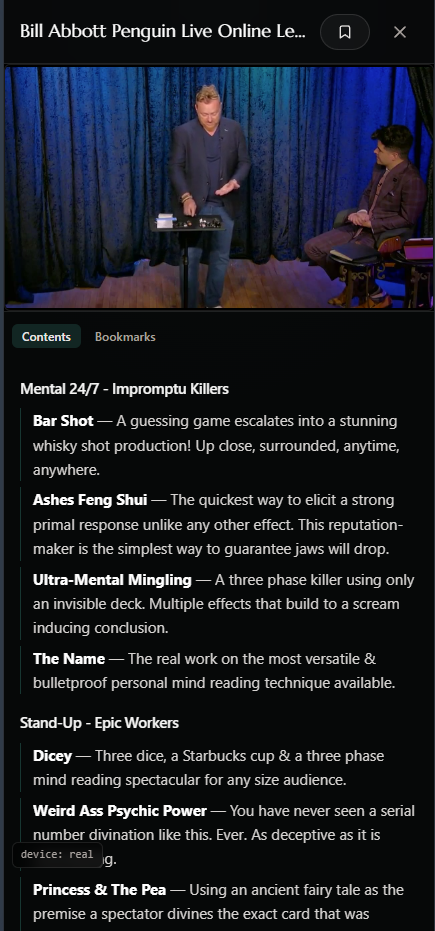
A built-in reader for your PDFs and ebooks and a player for your video, opening the files where they already sit on your computer. Nothing is moved, renamed or copied.
Drop a bookmark at a video timestamp or a PDF page, and keep your practice notes with the routine they belong to instead of in a separate app.
Start a lecture at your desk and finish it in bed. Your place in a video, your page in a PDF, your notes and bookmarks all follow you.
Your phone, tablet, or the laptop on the sofa opens the same shelf your computer holds. It streams off your own machine across your own Wi-Fi, with nothing synced, duplicated or uploaded.
Pull the items you want onto the device itself and they play with the Wi-Fi off entirely. The gig-bag version of your library, chosen by you.
Ripped DVDs from fifteen years ago are often in formats no browser can open. It finds those, tells you which they are, and writes a script that converts them and relinks your items.
The computer holding your library needs Chrome, Edge or Brave, on a desktop or laptop. That is the browser that can open a folder on your own disk.
The devices reading it can be anything with a browser. iPhone, iPad, Android, an old laptop. On a phone or tablet it adds itself to your home screen and opens like any other app.
You tell Maven what you own. You never hand over the files.
Your library is a folder of plain text files on your own computer, one per title, which you could open in Notepad right now. Titles and contents lists go out to do the research and to answer a plain-language question. Your PDFs, ebooks and video never do, there is nowhere to upload them, and nothing is stored.
What it writes about a book is not a summary of it. It is an index into it: every routine, who created it, and enough of the method to recognise it. Useless on its own, which is the point.
The mechanics
How it works.
The whole thing, plainly, including the parts that are less flattering.
- Adding an item
- You give it a title. It searches the open web the way you would, reads the pages it finds, and writes one plain text file into your folder: the contents, the creators and the year. A big first batch takes a while and runs on its own.
- Where the facts come from
- Routine names and their order are taken from published sources as written, not composed by a model. The model’s job is finding those sources and reconciling them when they disagree. Where it adds a line of description, that line is checked against a page it actually read.
- Your library on disk
- On a computer, one folder you choose, one file per title, readable in Notepad and exportable whenever you like. Your PDFs, ebooks and video are linked where they already sit, never moved, renamed or copied.
- What leaves your device
- Titles, to do the research. Your question plus the matching entries, to answer it in plain language. Never a file, and nothing is stored.
- Where the AI is, and isn’t
- The keyword filter runs in your browser against your own files, with no model involved at all. Plain-language search and the research pass use one, and it is included in the purchase with nothing to sign up for.
- Your other devices
- The computer holding the library needs Chrome, Edge or Brave, on a desktop or laptop, because that is the browser that can open a folder on your own disk. Anything with a browser can read from it over your Wi-Fi, device to device, and on a phone it installs to the home screen.
- Offline
- Turn the Wi-Fi off and your library still opens, browses and plays. Only asking and researching need the internet.
The complete privacy detail, including a real catalog entry →
“Maven is among the biggest revolutions in modern magic.”
Put your whole collection in one place.
Maven is in private beta right now. Leave your email to request an invite. No subscription, ever. When it opens up it’s a one-time purchase, and the AI is part of it.